Diwali, the Festival of Lights, is one of the most beautiful festivals in India. During this special occasion, people decorate their homes with diyas, colorful lights, rangoli, and enjoy the beauty of fireworks.
Nowadays, creating beautiful Diwali celebration images using Artificial Intelligence (AI) has become very popular. With the help of ChatGPT, you can transform an ordinary photo into a stunning festive image featuring traditional Indian outfits, colorful fireworks, glowing sky lanterns, and beautiful Diwali decorations.
In this guide, we will explain how to create a beautiful Diwali AI photo using ChatGPT, how to convert a normal photo into a festive image, and how to get the best results with a simple AI image prompt.
Create an ultra-realistic, professional Diwali celebration photograph using the uploaded photo as a reference.
Keep the child’s original face, facial identity, skin tone, eyes, nose, and natural facial features recognizable. Do not change the child’s identity.
The little boy is wearing a beautiful golden-orange traditional Indian kurta with intricate embroidery and a matching festive stole. He is standing on a beautifully decorated rooftop at night, holding a large glowing paper sky lantern with both hands.
The background features spectacular colorful Diwali fireworks in the night sky, beautiful golden fairy lights, glowing diyas, traditional rangoli designs, and decorative plants in terracotta pots.
The child is looking up at the glowing sky lantern with a happy and innocent smile. The warm golden light from the lantern illuminates his face naturally.
Create a cinematic festive atmosphere with realistic skin texture, professional DSLR photography, natural shadows, detailed traditional clothing, beautiful bokeh lights, sharp focus, and high-quality realistic photography.
Composition: Full-body portrait, vertical 9:16 aspect ratio, enough space above the child’s head, beautifully balanced background, natural proportions.
Make the final image look like a real professional Diwali photoshoot, not a cartoon or artificial illustration.
Generate AI photo
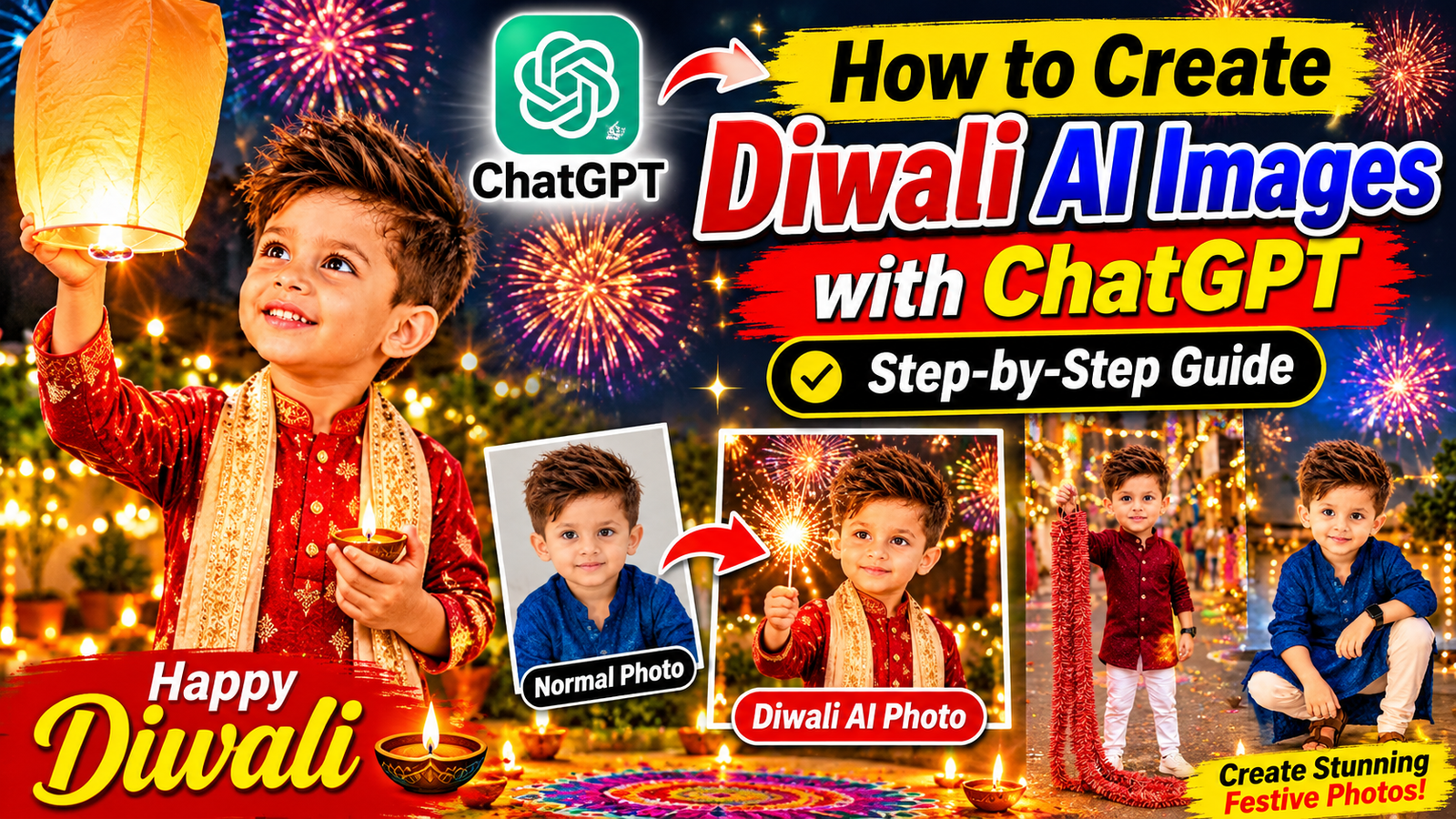
Beautiful Diwali AI Photo Transformation
These beautiful Diwali images showcase a cute little boy wearing traditional Indian outfits and celebrating the Festival of Lights.
The images feature:
- Beautiful traditional Indian kurta and sherwani outfits
- Colorful fireworks in the night sky
- Glowing sky lanterns
- Beautiful Diwali diyas and rangoli decorations
- Warm golden festive lighting
- Realistic photography-style image quality
You can create similar images using your own photo and a well-written ChatGPT image prompt.
How to Create Diwali AI Images Using ChatGPT
You do not need professional photography equipment or advanced editing skills to create these beautiful Diwali images. You can use ChatGPT to transform a normal photo into a festive AI-generated image.
Follow the steps below to create your own Diwali AI photo.
Step 1: Open ChatGPT
First, open the ChatGPT application or visit the ChatGPT website.
Log in to your account and open a new chat. Make sure you are using a version of ChatGPT that supports image generation and photo editing.
Step 2: Upload Your Normal Photo
Select the image upload option and upload a clear photo from your mobile phone or computer.
For the best results, choose a photo that has:
- A clear and visible face
- Good lighting
- A natural facial expression
- A front-facing or slightly angled pose
- Good image quality
A normal portrait photo can be used as the starting point for your Diwali AI image.
Step 3: Write a Detailed AI Image Prompt
After uploading your photo, tell ChatGPT what changes you want.
For example, you can ask ChatGPT to change the background into a beautiful Diwali celebration scene, add colorful fireworks, create traditional Indian clothing, and improve the lighting.
The more clearly you describe your desired image, the easier it is for ChatGPT to understand your idea.
Step 4: Use This ChatGPT Diwali Photo Prompt
Copy the following prompt and paste it into ChatGPT after uploading your photo.
AI Image Generation Prompt:
“Use the uploaded photo as the main reference and transform it into a beautiful, ultra-realistic Diwali celebration photograph. Keep the person’s facial identity, natural facial features, skin tone, and overall appearance recognizable.
Dress the person in a beautiful traditional Indian festive outfit, such as a golden kurta or a rich maroon sherwani. Create a stunning Diwali night background with colorful fireworks, glowing diyas, decorative lights, traditional rangoli, and a beautiful illuminated Indian home terrace.
Add warm golden lighting, realistic shadows, natural skin texture, cinematic photography, professional DSLR quality, sharp details, and a beautiful festive atmosphere.
Make the image look like a professionally captured real photograph, not an artificial cartoon. Keep the subject clearly visible and well-composed. Create a vertical 9:16 image suitable for Instagram Reels, YouTube Shorts, and social media posts.”
Step 5: Generate Your Diwali AI Photo
After entering the prompt, send your request to ChatGPT.
ChatGPT will process your uploaded photo and generate a new image based on your instructions.
Depending on your prompt, the final image may include:
- A traditional Diwali outfit
- A festive home or rooftop background
- Colorful fireworks
- Beautiful decorative lights
- A natural and realistic photography style
If the result does not look exactly as you imagined, you can ask ChatGPT to make additional changes.
Step 6: Improve the Image with Additional Instructions
You can make your image even better by giving ChatGPT additional instructions.
For example:
For a better background:
“Change the background to a beautiful Indian rooftop decorated with Diwali lights, diyas, and colorful fireworks.”
For a traditional outfit:
“Change the outfit into a beautiful golden traditional Indian kurta with detailed embroidery.”
For a more realistic look:
“Improve the image quality, add natural skin texture, realistic lighting, and professional DSLR photography details.”
For a full-body image:
“Make the image full body with enough space above the head and below the feet. Keep the subject naturally proportioned.”
For a sky lantern scene:
“Create a beautiful Diwali scene where the person is holding a glowing paper sky lantern with colorful fireworks in the background.”
Step 7: Download and Share Your AI Image
Once you are happy with the final result, save the generated image to your device using the image download option.
You can use your beautiful Diwali AI image for:
- Instagram posts and Reels
- Facebook posts
- WhatsApp status
- YouTube thumbnails
- Festival greetings
- Personal photo collections
Always make sure that you have permission to use the original photo, especially when it belongs to another person.
How to Make Your Diwali AI Photo Look More Realistic
If you want to create a realistic AI-generated Diwali image, follow these simple tips.
- Use a clear and high-quality original photo.
- Describe the background and outfit in detail.
- Ask ChatGPT to preserve the person’s facial identity.
- Avoid adding too many unnecessary elements.
- Use natural lighting and realistic shadows.
- Specify the image aspect ratio, such as 9:16 or 16:9.
- Make small improvements through additional prompts.
A detailed prompt and a good reference photo can help you create a beautiful and professional-looking festive image.
Beautiful Diwali AI Image Ideas
Here are some creative Diwali image ideas you can try using ChatGPT.
1. Diwali Sky Lantern Photography
Create a beautiful image of a person holding a glowing sky lantern with colorful fireworks in the background.
2. Traditional Diwali Outfit Photography
Transform a normal photo into a beautiful festive portrait featuring a golden kurta, maroon sherwani, or traditional Indian clothing.
3. Diwali Fireworks Background
Create a stunning night scene with colorful fireworks, decorative lights, and a beautiful festive atmosphere.
4. Diwali Rooftop Photography
Create a realistic Diwali rooftop image with glowing diyas, rangoli, plants, and decorative lights.
5. Cute Kids Diwali AI Images
Create adorable festive portraits of children wearing traditional Indian outfits and enjoying the beautiful Diwali atmosphere. For children’s images, use safe festive scenes and keep them away from actual fireworks and open flames.
Benefits of Creating Diwali Images with ChatGPT
ChatGPT makes it easier to create personalized festive images without requiring advanced photo editing skills.
Some benefits include:
- Easy photo transformation
- Creative background changes
- Traditional outfit customization
- Personalized festive photography
- Multiple image styles and ideas
- Simple instructions for beginners
You can experiment with different prompts to create unique Diwali images that match your personal style.
Frequently Asked Questions (FAQs)
Can I create Diwali AI images using ChatGPT?
Yes. ChatGPT supports image generation and photo editing in supported experiences. You can upload a photo and describe the Diwali image you want to create.
How can I convert a normal photo into a Diwali AI image?
Upload your normal photo to ChatGPT, enter a detailed Diwali image prompt, and ask ChatGPT to transform the background, outfit, lighting, and festive atmosphere.
Can ChatGPT change the background of my photo?
Yes. You can ask ChatGPT to change your photo background into a Diwali rooftop, decorated home, festive street, or fireworks scene.
Can I keep my original face in a Diwali AI image?
You can ask ChatGPT to preserve your original facial identity and appearance. However, exact facial preservation is not always guaranteed.
Do I need professional editing skills?
No. You can create beautiful AI images by uploading a photo and providing clear instructions.
Can I create Diwali AI images for Instagram and YouTube?
Yes. You can request vertical 9:16 images for Reels and Shorts or 16:9 images for YouTube thumbnails.
Conclusion
Creating beautiful Diwali AI images using ChatGPT is a simple and creative way to celebrate the Festival of Lights.
By uploading a normal photo and using a detailed AI image prompt, you can transform an ordinary picture into a beautiful festive photograph featuring traditional Indian outfits, colorful fireworks, glowing diyas, and stunning Diwali decorations.
Whether you want to create a personal festive portrait, a social media post, or a beautiful Diwali greeting image, ChatGPT can help you bring your creative ideas to life.
Try the step-by-step tutorial and create your own beautiful Diwali AI image.
Happy Diwali 2026! May your life be filled with happiness, prosperity, peace, and endless light.