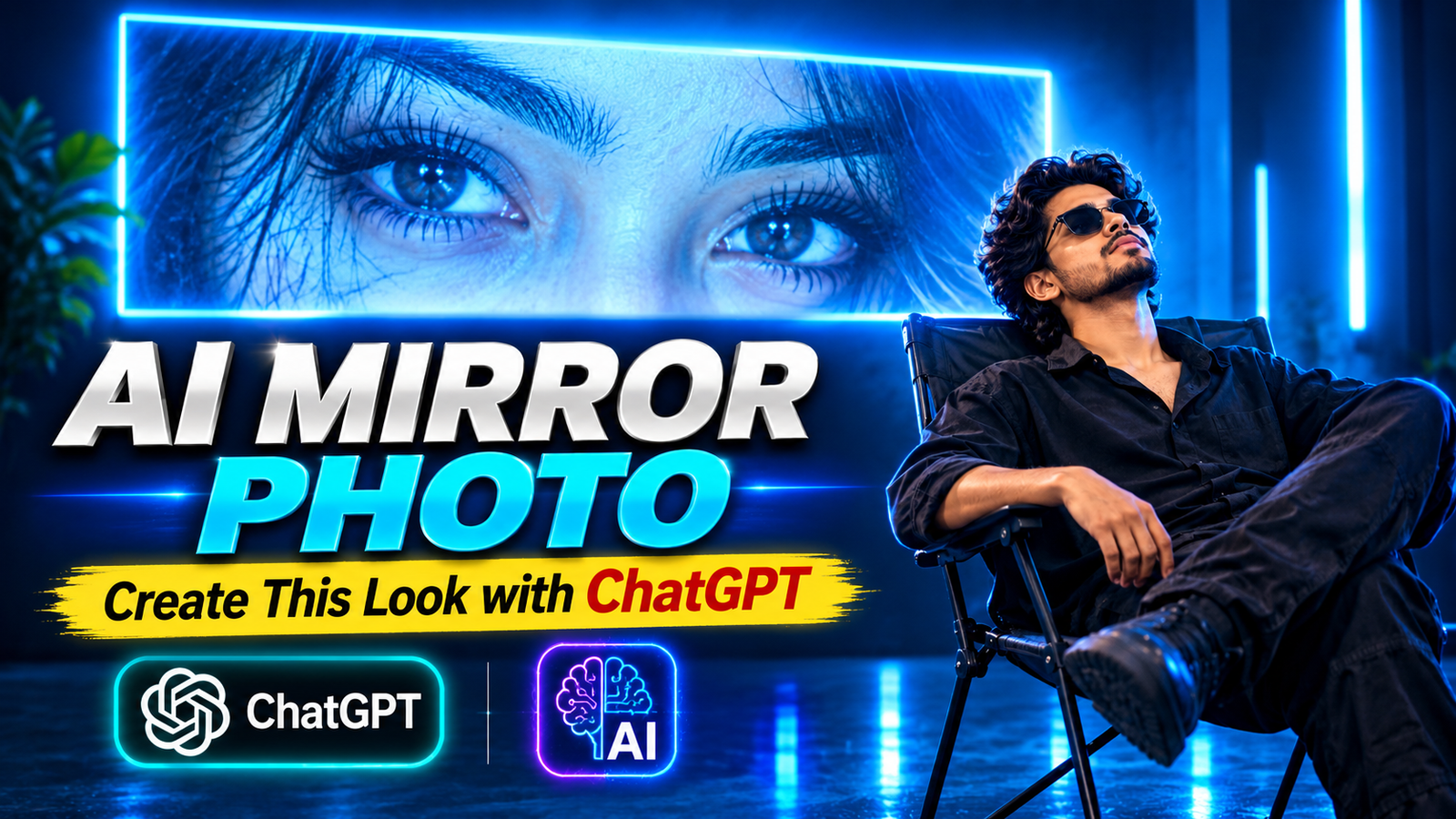
Want to create a unique and cinematic AI photo using ChatGPT? This trending AI photo editing style features a dark blue background, glowing neon lighting, a large illuminated screen displaying beautiful eyes, and a person sitting on a chair while looking towards the screen.
You can transform your normal photo into this stunning cinematic portrait using ChatGPT. The combination of electric blue lighting, dramatic shadows, and a professional photography look makes this AI photo perfect for Instagram, Facebook, and other social media platforms.
Cinematic Blue Neon AI Photo Editing Prompt
Copy the prompt below and paste it into ChatGPT to create a similar cinematic AI portrait.
Copy This Prompt:
Create an ultra-realistic, cinematic portrait using the uploaded reference photo. Preserve the person’s original face, facial features, hairstyle, skin tone, and identity exactly as shown in the reference image.
Show the person sitting comfortably on a simple black folding chair in a dark photography studio. The person is wearing a stylish all-black outfit, including a black shirt, black trousers, and dark sunglasses. Create a relaxed leaning-back pose with the head slightly tilted upward, looking towards a large horizontal rectangular LED screen mounted on the wall.
The LED screen should display a beautiful extreme close-up photograph of expressive female eyes, with realistic eyelashes, detailed eyebrows, and natural skin texture. Surround the screen with an intense electric blue neon glow.
Use a completely dark navy-blue studio background with dramatic blue rim lighting around the person’s body and face. Add soft blue reflections on the floor, deep cinematic shadows, and professional studio lighting. The overall atmosphere should look mysterious, aesthetic, futuristic, and cinematic.
Maintain realistic body proportions, natural skin texture, accurate details, and professional DSLR photography quality. Do not change the person’s identity. Vertical 9:16 composition, high resolution, photorealistic result.
How to Create This AI Photo Using ChatGPT
Follow these simple steps to create your own cinematic blue neon AI photo.
Step 1:
First, open the ChatGPT app on your mobile phone or visit the ChatGPT website.
Step 2:
Upload your normal photo to ChatGPT. Choose a clear picture so that the AI can understand your face and preserve your original identity.
Step 3:
Copy the Cinematic Blue Neon AI Photo Editing Prompt given above and paste it into the ChatGPT message box.
Step 4:
Now click on the Generate button to start creating your AI photo.
Step 5:
Wait for a few moments while ChatGPT processes your request and generates the image.
Step 6:
Once your photo is ready, you can view and save your new cinematic blue neon portrait to your device.
Final Words
Creating a cinematic blue neon AI photo is easy with ChatGPT. You only need a normal picture and the right AI photo editing prompt. Follow the steps above, copy the prompt, and generate your own stunning portrait with glowing blue lights, a dark studio background, and a dramatic cinematic atmosphere.
Try this AI photo editing style and share your creative results on your favorite social media platforms.