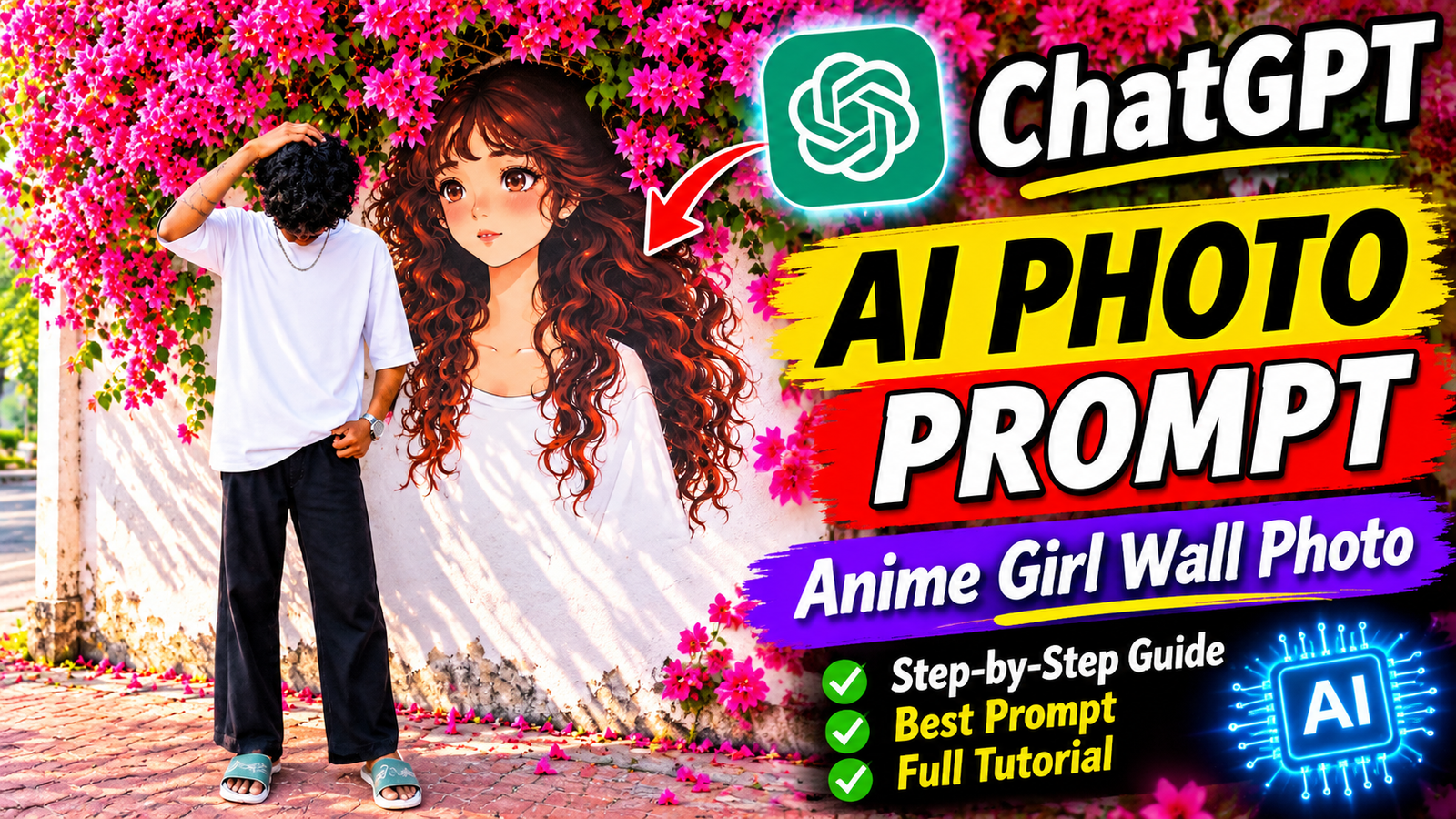
AI photo editing is becoming one of the most popular trends on social media. One of the latest creative styles is combining a real person with a beautiful anime girl mural, surrounded by colorful pink flowers.
These photos look aesthetic, cinematic, and highly realistic. The combination of a real person, a giant anime-style girl painted on a wall, and beautiful pink bougainvillea flowers creates a unique visual effect.
If you want to create this type of AI photo using ChatGPT, this tutorial is for you.
In this article, you will learn how to create an AI Anime Girl Wall Photo using ChatGPT, how to upload your reference image, and how to use the best AI photo editing prompt for stunning results.
What Is an AI Anime Girl Wall Photo?
An AI Anime Girl Wall Photo is a creative image that combines a real-life person with an anime-style character or mural in a realistic outdoor environment.
The image typically features a young man standing beside a large anime girl illustration painted on a wall. The background may include pink flowers, natural sunlight, a street, and an aesthetic outdoor setting.
Some popular features of this photo style include:
- Realistic full-body photography
- Large anime girl wall mural
- Beautiful pink bougainvillea flowers
- Aesthetic outdoor background
- Casual fashion outfit
- Natural sunlight and shadows
- Realistic wall texture
- Cinematic photography style
- High-quality AI image generation
You can recreate this photo style using ChatGPT with a suitable reference image and a detailed prompt.
How to Create an AI Anime Girl Photo Using ChatGPT
Follow these simple steps to create your own AI photo.
Step 1: Open ChatGPT
First, open the ChatGPT website or mobile application.
Log in to your account and access the available image generation feature.
Step 2: Upload Your Reference Photo
Choose a clear photograph of yourself and upload it to ChatGPT.
For the best results, use a photo where your face and body are clearly visible.
A full-body photograph is recommended if you want to create an image similar to the example.
Step 3: Copy the AI Photo Editing Prompt
After uploading your photo, copy the prompt below and paste it into ChatGPT.
Best ChatGPT Anime Girl Wall Photo Prompt
Create an ultra-realistic, high-quality outdoor photograph using the uploaded reference image as the identity reference.
Preserve the young man’s original facial identity, facial features, hairstyle, skin tone, and natural appearance as closely as possible. Do not unnecessarily alter his face.
Show the young man standing casually beside a beautiful large anime girl mural painted on an old white outdoor wall.
The young man is wearing an oversized plain white T-shirt, relaxed-fit black wide-leg trousers, casual green-and-white slide sandals, a simple silver chain necklace, and a stylish wristwatch.
His pose is natural and aesthetic. One hand is gently placed on top of his curly hair, while the other hand rests casually near his trouser pocket. His head is slightly lowered, creating a relaxed and fashionable street photography look.
The wall features a large, beautiful anime-style girl illustration with enormous expressive brown eyes, long flowing dark brown curly hair, a soft expression, and a simple white outfit. The anime girl mural should appear naturally painted onto the wall, with realistic wall texture and subtle artistic details.
Above the wall, create a stunning canopy of vibrant pink bougainvillea flowers with lush green leaves. The flowers should extend across the upper part of the frame, creating a dreamy and romantic atmosphere.
The background includes a quiet outdoor street, natural sunlight, a textured brick pavement, subtle shadows, and a realistic urban environment.
Composition: Full-body vertical portrait, 9:16 aspect ratio. Keep the entire person visible from head to feet. Leave enough space above the subject’s head. Position the young man on the left side of the frame and the anime mural on the right.
Photography style: Professional DSLR photography, 50mm lens, realistic skin texture, natural sunlight, soft shadows, cinematic color grading, sharp details, realistic fabric texture, photorealistic environment, premium aesthetic photography, high-resolution image quality.
Important: Keep the real person photorealistic and the anime girl illustrated. Do not turn the real person into an anime character. Avoid distorted hands, extra fingers, blurry faces, unnatural body proportions, artificial skin, or unrealistic flower arrangements.
Step 4: Generate Your AI Photo
After pasting the prompt, send your request to ChatGPT.
ChatGPT will generate an image based on your reference photo and the instructions provided.
If the result does not match your expectations, you can refine the prompt.
For example, you can ask:
- Keep my face closer to the original reference photo.
- Make the anime girl mural larger.
- Add more pink bougainvillea flowers.
- Make the background more realistic.
- Improve the full-body composition.
- Make the lighting more natural and cinematic.
Step 5: Save Your AI-Generated Image
Once you are satisfied with the result, open the generated image and use the available download or save option.
You can now use your AI-generated photograph for Instagram, Facebook, WhatsApp, or other social media platforms
How to Get the Best Results from ChatGPT AI Photo Editing
If you want your AI photo to look professional and realistic, follow these tips:
Use a High-Quality Reference Image
Always upload a clear photograph with good lighting. A clear reference image helps ChatGPT maintain the person’s visual appearance.
Describe the Background Clearly
Mention specific details such as pink flowers, an anime mural, a white wall, a street, and natural sunlight.
Use a Detailed Outfit Description
Describe the outfit, colors, accessories, and overall fashion style.
Specify the Image Aspect Ratio
If you want a vertical Instagram or Facebook photo, use a 9:16 aspect ratio.
For a website featured image or YouTube thumbnail, use a 16:9 aspect ratio.
Refine the Prompt When Necessary
AI-generated images may not always match your expectations perfectly. You can request additional changes to the face, pose, background, lighting, or composition.
Can You Create AI Anime Photos Using ChatGPT for Free?
ChatGPT provides image generation capabilities, but availability and usage limits may depend on your account and subscription plan.
You can check the image generation options available in your account before creating your photo.
Frequently Asked Questions (FAQs)
1. How can I create an AI Anime Girl Wall Photo?
Upload your reference photo to ChatGPT, copy the AI photo prompt provided in this article, and ask ChatGPT to generate the image.
2. Can I use my own face in the AI photo?
Yes. You can upload your own reference image and ask ChatGPT to preserve your facial identity as closely as possible.
3. Can I change the anime girl design?
Yes. You can describe different anime hairstyles, eye colors, outfits, expressions, and artistic styles.
4. Which aspect ratio is best for this photo?
A 9:16 vertical aspect ratio is suitable for full-body social media photos. A 16:9 aspect ratio is recommended for website featured images and thumbnails.
5. Does ChatGPT create realistic AI photos?
ChatGPT can generate highly realistic images when provided with detailed instructions and a suitable reference image. However, the final result may vary.
Conclusion
Creating an AI Anime Girl Wall Photo with ChatGPT is a simple and creative way to transform an ordinary photograph into a beautiful aesthetic image.
By using the right reference photo, a detailed image generation prompt, and the correct composition, you can create a stunning AI photograph featuring a real person and a beautiful anime girl mural surrounded by pink flowers.
Follow the steps in this tutorial, copy the prompt, and start creating your own AI photo.
If you found this guide helpful, share it with your friends and explore more AI photo editing tutorials on our website.